All-in-one production suite

Run your production from one place.

A complete production pipeline — in your browser.

From script breakdown to wrap report — FilmDocs replaces the spreadsheets, the PDFs, and the back-and-forth between departments with 40 connected tools that share data automatically.

Start free — no card See live preview
No install · Open in your browser · 40 tools, 1 free project
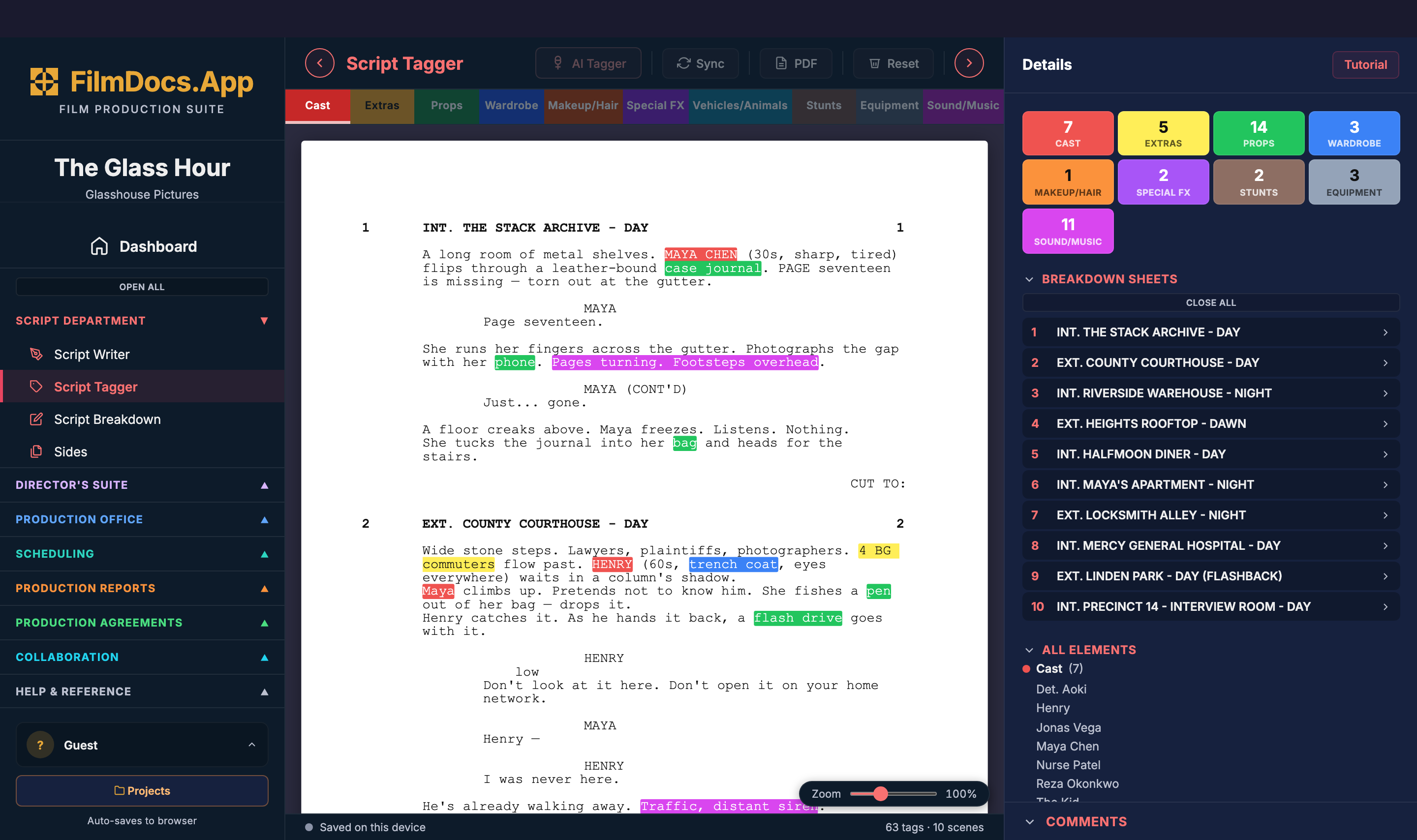
filmdocs.app · Script Tagger — The Glass Hour
FilmDocs Script Tagger — tagged screenplay with cast, props, wardrobe, and extras highlighted
The tools

From the first draft to the final wrap report.

Every tool below is connected to the next. Edit a scene in the breakdown — the stripboard,
call sheet, and DPR all see the change. No re-typing, no syncing files between apps.

Pre-production

Script & Breakdown, in one flow.

Write in industry-standard screenplay format, then tag every scene for cast, props, locations, wardrobe, VFX, and stunts — without ever leaving the page.

  • AI-assisted breakdown — tag a feature in minutes, not hours
  • Auto-syncs to your stripboard and call sheets
  • Lined script and coverage logs for the script supervisor
  • Watermarked PDF export on the free tier
Open Script Writer
filmdocs.app · Script Breakdown Click to zoom
Script Breakdown — tagged scenes with cast, props, and wardrobe per scene
Scheduling

Drag-and-drop scheduling that knows your script.

Strip your script into shoot days. Drag scenes between days, watch the page count update, and generate a DOOD that knows when each actor starts, works, and wraps.

  • Full stripboard with INT/EXT/DAY/NIGHT color coding
  • Days Out of Days auto-generated from the schedule
  • Page-count math handled automatically
  • One click to push the day's scenes to the call sheet
Open Stripboard
filmdocs.app · Stripboard Click to zoom
Stripboard — color-coded scene strips arranged by shoot day
On-set

Studio-grade PDFs, in seconds.

Call sheets, daily production reports, camera reports, sound reports, DIT reports — every form your set needs, formatted to industry standard, exported the moment you finish.

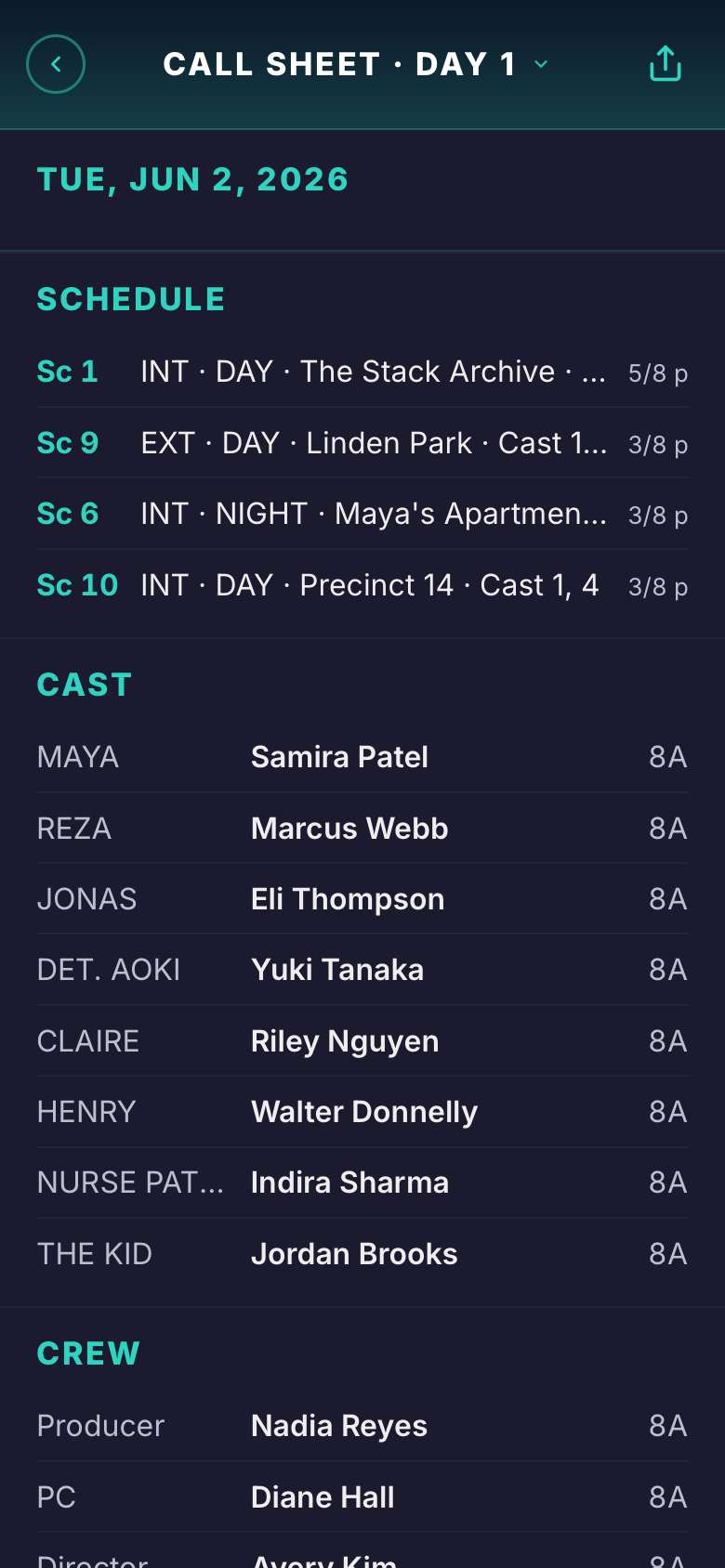
  • Call sheet auto-fills from the day's stripboard scenes
  • Daily Production Report — the legal record of every shoot day
  • Camera, Sound, DIT, Script Supervisor reports for every department
  • Cast, crew, and location details flow in automatically
Open Call Sheet
filmdocs.app · Call Sheet Click to zoom
Call Sheet — formatted call sheet with schedule, cast, and crew
Production office

Budget & cost tracking that closes the loop.

Build an above-the-line and below-the-line budget by department, then watch the cost report tick against it as the production runs. Variance, not surprises.

  • Full department breakdown — ATL, BTL, post, contingency
  • Cost report with running totals and budget variance
  • Vendor manager and contacts directory for everyone you pay
  • Production agreements (NDA, deal memos, releases) ready to send
Open Production Budget
filmdocs.app · Production Budget Click to zoom
Production Budget — ATL/BTL accounts with line-item details
Distribute

Send call sheets for RSVP. Releases for e-sign.

Every doc that needs a signature, an RSVP, or a fill-in goes out by email and SMS in one click. Recipients open a hosted page on any device — no install, no account — and reply right there. Their answers thread back into FilmDocs in real time.

  • Email + MMS delivery built in (Resend + Twilio under the hood)
  • One-tap RSVP buttons on call sheets — Confirm / Tentative / Decline + per-recipient note
  • Talent intake forms — actors fill in sizes, contact, photos from their phone
  • PDF rides along (call sheet, release, deal memo) — recipients can save it without an account
  • Tap-to-call phone numbers, tap-to-Maps locations, automatic tracking of who's opened & responded
  • Per-recipient remarks ("Sarah — pickup at 5:30am, gate code 4477") rendered into their copy only
Open Call Sheet
Real exports

Real screenshots. Real PDFs.

Every frame below is from the actual app and the file it produces. Hover any cell — pick the screenshot, or open the PDF that comes out of it.

Script Tagger screenshot
Script Tagger
Script Breakdown screenshot
Script Breakdown
Script Supervisor screenshot
Script Supervisor
Stripboard screenshot
Stripboard
Call Sheet screenshot
Call Sheet
Shot List screenshot
Shot List
Production Budget screenshot
Production Budget
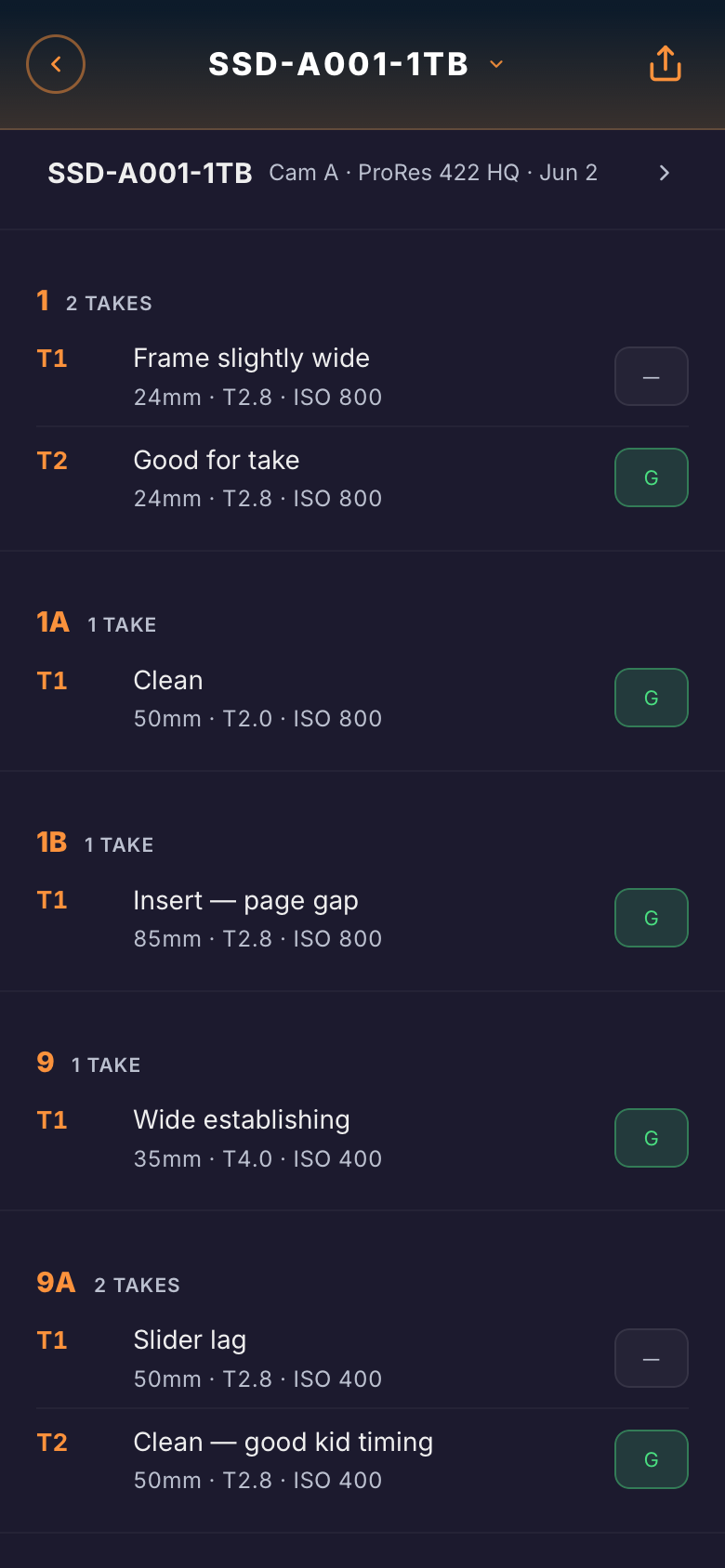
Camera Report screenshot
Camera Report
Cast & Crew List screenshot
Cast & Crew List
Everything in the box

40 tools. One subscription.

Organized exactly like the app — six departments, each colour-coded. No add-ons, no per-tool paywalls. Every paid tier gets the full suite.

Why FilmDocs

A real production suite, not a paywall maze.

Most production software puts the tools you actually need behind separate tiers. We don't.

FilmDocs Other suites
Free tier with PDF export Watermarked, but real Trial only, then paywall
Student tier $5/mo Not offered
Indie tier $20/mo $29+/mo elsewhere
All 40 tools, all paid tiers Per-tool paywalls common
AI-assisted breakdown Included on paid tiers Add-on or premium-only
Unlimited viewers Free read-only access Per-seat for everyone
Browser-based, zero install Often desktop-app or installer
Comparison reflects publicly listed pricing as of April 2026. Tools mentioned are not affiliated with FilmDocs.App.
Pricing

Pick a tier. Cancel any time.

No hidden add-ons. No per-tool upsells. The full suite is included on every paid tier.

Free
$0
forever
  • 1 project
  • 6 tools export PDF (watermarked)
  • Single editor
  • Local only — no cloud backup
Start free
Student
$50/yr
edu email required
  • Up to 5 projects
  • All 40 tools, no watermark
  • 3 collaborators per project
  • Unlimited read-only viewers
  • AI breakdown included
  • Cloud backup across devices
Start as student
Team
$150/seat/yr
3-seat minimum · $45/mo entry
  • Shared workspace
  • Multi-owner projects
  • Unlimited collaborators
  • Per-seat pricing scales with team
  • Unlimited read-only viewers
  • Everything in Indie
Start a team
For educators
Teach production with the real tools.
$99/yr per instructor — invite up to 30 students. Students join your classroom workspace and collaborate on assigned projects; you grade in-app with full visibility into every scene, take, and revision. Each student also gets a personal Student-tier account for thesis and side work — yours for the semester, theirs to keep after.

Larger programs: institutional licenses available for film schools and university departments.
Contact us →
FAQ

Questions, answered.

Do I need to install anything?
No. FilmDocs runs entirely in your browser. Open a tab, sign in, and start working. Your projects sync to the cloud automatically.
Can I try it before paying?
Yes — the free tier is permanent, not a trial. You get one project, full editing access on every tool, and watermarked PDF export on six tools. No card required.
How does collaboration work?
On Student you can invite up to 3 editors per project; on Indie up to 5. Both plans also include unlimited read-only viewers. On Team you share a workspace with unlimited collaborators where every member can own and edit projects.
What's the AI breakdown?
Paste in your script and FilmDocs auto-tags scenes for cast, props, locations, wardrobe, VFX, and stunts. Catches the obvious stuff in seconds — you fix the edge cases.
How do you compare to Celtx and StudioBinder?
FilmDocs gives you all 40 tools at every paid tier. Indie pricing undercuts the comparable plans, and there's a real $5 student tier. No per-tool paywalls — if it's listed, you get it.
Can I cancel?
Any time, from your account dropdown. Your projects stay accessible on the free tier; you keep your data.
Where is my data stored?
In a secure Postgres database hosted on Supabase, with row-level security so only you and the people you invite can see your projects. Local browser cache keeps it fast.
Will it work offline?
FilmDocs uses optimistic local saves — if your connection drops mid-edit, your changes queue locally and push when you're back online. Full offline mode is on the roadmap.

Start your first project free.

No credit card. No install. Open it in your browser and run your production from one place.

Start free — no card