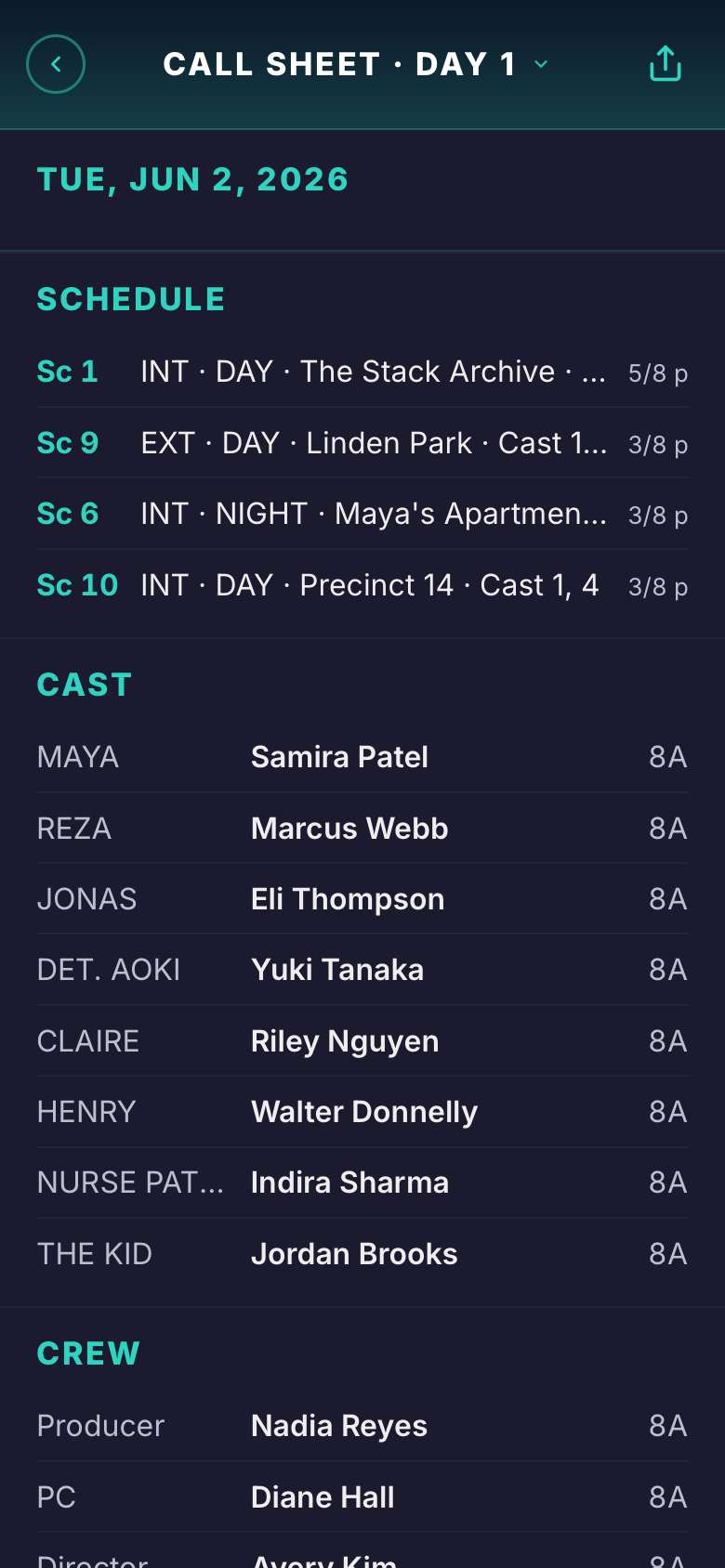
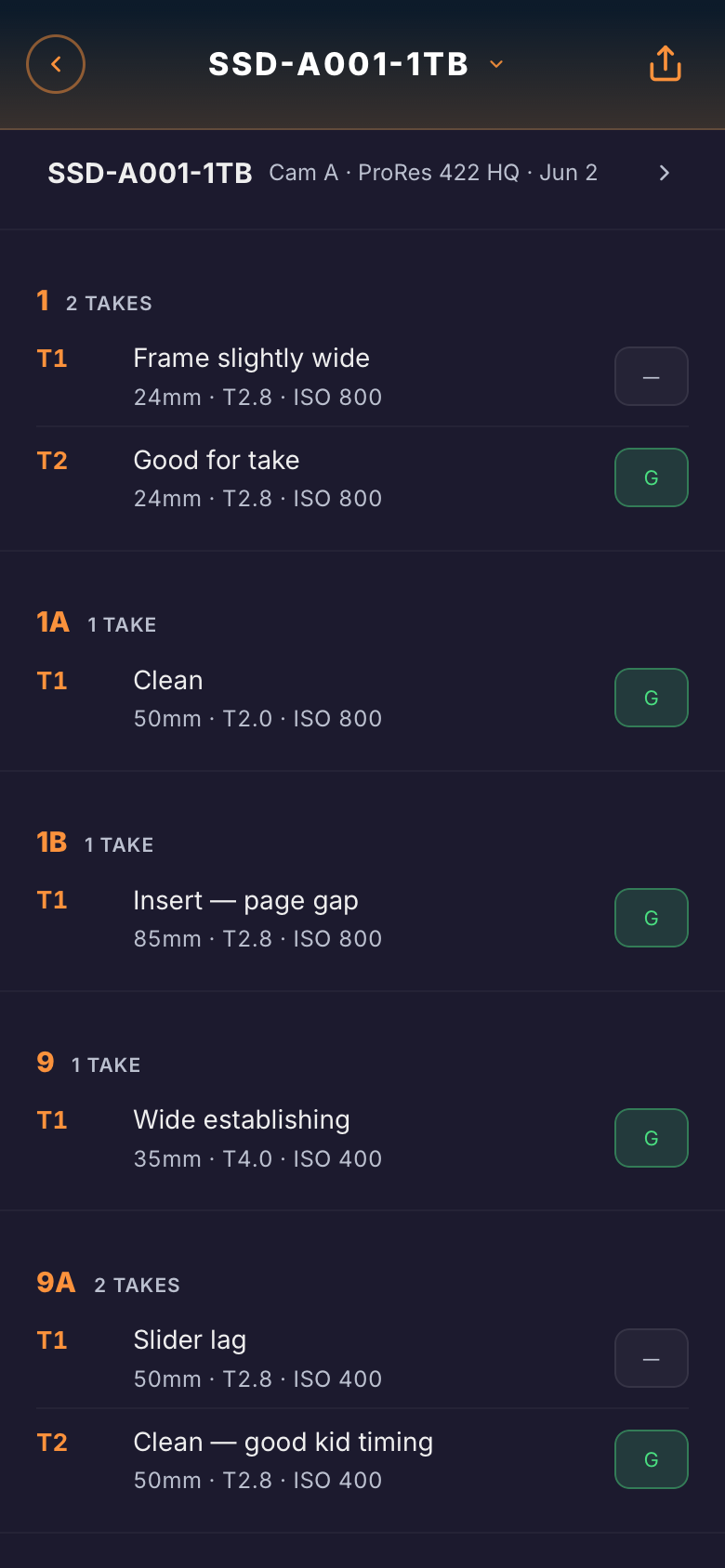
Built by a film professor · 40 tools · one production

Write it. Break it down. Schedule it. Shoot it. Wrap it.

Screenplay, breakdown, stripboard, call sheet, budget, contracts, wrap report — the whole production, in one browser tab.

Enter a scene once and it flows to the breakdown, the stripboard, the call sheet, and the wrap report on its own — every tool reads the same live data. Free to start, no install, nothing to download.

Start free — no card
Free forever tier · 40 tools, 1 free project · 🎓 Students: $5/mo
filmdocs.app · The Glass Hour
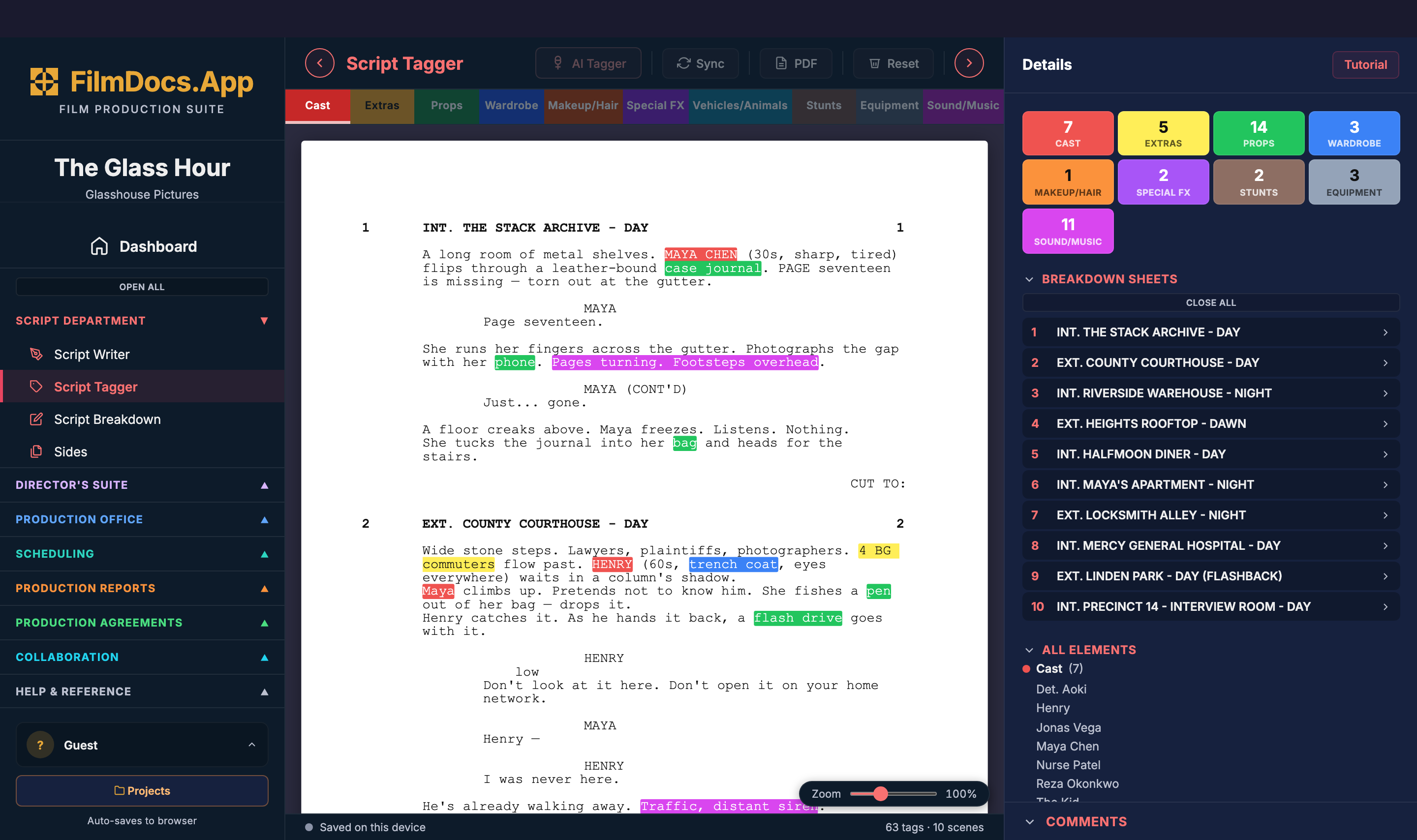
FilmDocs live demo — The Glass Hour open in Script Tagger

FilmDocs came out of my classroom. In twenty-five years of teaching film production, my students fought the same battles every semester: messy templates, formatting that fell apart, the same information retyped into document after document. I wanted to give them one place where everything lives together, data flows between documents, and every printed page comes out looking professional — so they could stop wrestling with paperwork and actually run their productions.

Everything in the box

40 tools. One subscription.

Script to wrap report — six colour-coded departments, every tool on every paid tier. No add-ons, no per-tool paywalls. Watch the Dashboard tour, or open the live demo and click through all forty yourself.

Script Writer Script Tagger Script Breakdown Sides
Gallery Script Liner Shot List Storyboard Overhead Diagram Script Analysis
Production Budget Contacts Directory Cast & Crew List Talent Manager Location Manager Vendor Manager Production Catalog
Task Manager Stripboard Day Out of Days Call Sheet
Script Supervisor Daily Production Report Cost Report Camera Report Sound Report DIT Report Wrap Report
Crew Deal Memo Volunteer Deal Memo Talent Release Extra Release Location Release Basecamp Agreement Non-Disclosure Agreement Vendor Agreement Composer Agreement Materials Release
Files Comments
filmdocs.app · Dashboard Watch the full tour
3:32
Three flows, up close

From the first draft to the final wrap report.

A closer look at four of the flows — RSVPs and signatures coming back from set, the first breakdown, the budget that closes the loop, and the binder in every crew pocket.

Distribute

Send call sheets for RSVP. Releases for e-sign.

Every doc that needs a signature, an RSVP, or a fill-in goes out by email and SMS in one click. Recipients open a hosted page on any device — no install, no account — and reply right there. Their answers thread back into FilmDocs in real time.

  • Email + MMS delivery built in (Resend + Twilio under the hood)
  • One-tap RSVP buttons on call sheets — Confirm / Tentative / Decline + per-recipient note
  • Talent intake forms — actors fill in sizes, contact, photos from their phone
  • PDF rides along (call sheet, release, deal memo) — recipients can save it without an account
  • Tap-to-call phone numbers, tap-to-Maps locations, automatic tracking of who's opened & responded
  • Per-recipient remarks ("Sarah — pickup at 5:30am, gate code 4477") rendered into their copy only
Pre-production

Script & Breakdown, in one flow.

Write in industry-standard screenplay format, then tag every scene for cast, props, locations, wardrobe, VFX, and stunts — without ever leaving the page.

  • AI-assisted breakdown — tag a feature in minutes, not hours
  • Auto-syncs to your stripboard and call sheets
  • Lined script and coverage logs for the script supervisor
  • Watermarked PDF export on the free tier
filmdocs.app · Script Breakdown Watch the 2-min tour
2:28
Production office

Budget & cost tracking that closes the loop.

Build an above-the-line and below-the-line budget by department, then watch the cost report tick against it as the production runs. Variance, not surprises.

  • Full department breakdown — ATL, BTL, post, contingency
  • Cost report with running totals and budget variance
  • Vendor manager and contacts directory for everyone you pay
  • Production agreements (NDA, deal memos, releases) ready to send
filmdocs.app · Production Budget Watch the 2-min tour
2:08
On set

The paperwork follows the crew to set.

Every phone on the crew carries the whole production binder — and the reports that get filled standing up are filled standing up. No printouts, no "I'll type it up tonight."

  • Camera, Sound & DIT reports are phone-editable — log takes at the camera, the cart, or the DIT station, and they sync into the production instantly
  • Every tool opens on the phone and shares from it — text the call sheet, send today's sound report, fire off sides, straight from the phone's share sheet
  • Tap-to-call numbers and tap-to-Maps locations, everywhere they appear
  • Add it to the home screen and it works like an app — nothing to download, nothing to install
Why FilmDocs

A real production suite, not a paywall maze.

Most production software puts the tools you actually need behind separate tiers. We don't.

FilmDocs.App
  • All 40 tools on every paid tier — no per-tool paywalls, ever
  • 10 production agreements with remote e-sign — NDAs, deal memos, releases
  • Lighting & overhead diagrams built in
  • Student plan, $5/mo — full cloud suite with a school email
  • Full suite from $25/mo — budgets, cost reports, AI breakdown included
  • Free tier with real PDF export — watermarked, but real
  • Unlimited free read-only viewers — nobody pays to receive paperwork
  • Browser-based, zero install — works on set, on anything
Other suites
  • Per-tool paywalls and paid add-ons
  • Agreements & e-sign not offered
  • Diagrams not offered
  • No student pricing
  • $29–$49/mo entry — with less inside
  • Free trial, then the paywall
  • Per-seat charges for everyone
  • Desktop installers and version updates
Comparison reflects publicly listed pricing as of April 2026. Tools mentioned are not affiliated with FilmDocs.App.
Pricing

Four sizes. One full suite.

Every paid tier gets all 40 tools. The tiers differ on editors, storage, and whose logo goes on the PDFs — that's it. Cancel any time.

Free
$0
forever
  • 1 project
  • 6 tools export PDF (watermarked)
  • Single editor
  • Local only — no cloud backup
Start free
Solo
$20/mo · billed yearly
the solo filmmaker
  • Unlimited projects & script pages
  • All 40 tools, no watermark
  • AI tagging, breakdown & analysis
  • Unlimited read-only viewers
  • Cloud backup across devices
  • 5 GB storage
Choose Solo
Crew
$75/mo · billed yearly
for teams · up to 5 editors
  • Everything in Pro
  • Up to 5 editors, shared workspace
  • 300 GB storage
  • Unlimited read-only viewers
  • Need more than 5? Talk to us
Start a team
🎓 Student? $5/mo (.edu email required) — full suite, no watermark, collaborate with classmates. Start as a student →
For educators
Teach production with the real tools.
$99/semester per instructor — bring up to 30 students. Students join your classroom on free accounts — no cards, no cost to them — and work in assigned projects while you build rubrics, grade in-app, and hand feedback straight back. When the semester wraps, their work is theirs: any student can convert to a paid plan and keep building on it.

Pilot program: we're opening the classroom to educational institutions free for the remainder of 2026 — get in touch.
Contact us →
FAQ

Questions, answered.

Do I need to install anything?
No. FilmDocs runs entirely in your browser. Open a tab, sign in, and start working. On paid and Student plans your projects sync to the cloud automatically; the free tier saves locally in your browser.
Can I try it before paying?
Yes, twice over. The live demo opens a full sample production right on this page — every tool, real data, no account. And the free tier is permanent, not a trial: one project, full editing access on every tool, watermarked PDF export on six tools. No card required.
How does collaboration work?
Solo is single-user. Pro adds a second editor seat, and Crew covers five editors — invited editors join free under your plan, and if you need more than five, talk to us. Student works a little differently: you can collaborate with up to 3 other students, but each keeps their own $5 plan. Every paid tier also includes unlimited read-only viewers, who never need a paid seat.
What's the AI breakdown?
Paste in your script and FilmDocs auto-tags scenes for cast, props, locations, wardrobe, VFX, and stunts. Catches the obvious stuff in seconds — you fix the edge cases.
How do you compare to Celtx and StudioBinder?
FilmDocs gives you all 40 tools at every paid tier. Solo pricing undercuts the comparable plans, and there's a real $5 student tier. No per-tool paywalls — if it's listed, you get it.
Can I cancel?
Any time, from your account dropdown. Nothing is deleted when you cancel — you drop to the free tier, where one project stays fully editable and your work stays exportable. Export any PDFs you need before you downgrade.
Where is my data stored?
In an encrypted cloud database — only you and the people you invite can ever see your projects. A local browser cache keeps everything fast, and your data is yours: export your documents as PDFs any time.
Does it work on my phone?
Yes. Every tool is viewable and sharable from your phone, and the Camera, Sound, and DIT reports are fully editable on mobile — built for logging takes on the floor. Add FilmDocs to your home screen and it works like an app, no download needed.
Who qualifies for the Student plan?
Anyone with a school email address (.edu or international equivalents like .ac.uk) — verified at checkout, $5/month, no other paperwork. You keep the plan as long as the email is yours. Faculty: see the educators section above for the classroom program.
Will it work offline?
FilmDocs uses optimistic local saves — if your connection drops mid-edit, your changes queue locally and push when you're back online. Full offline mode is on the roadmap.

Start your first project free.

No credit card. No install. Open it in your browser and run your production from one place.

Start free — no card